Money Flex AI Prompt (Copy and Paste) for Image-to-Video Apps
October 25, 2026
Want to star in the Money Flex meme? Turn your photo into it.Make my video →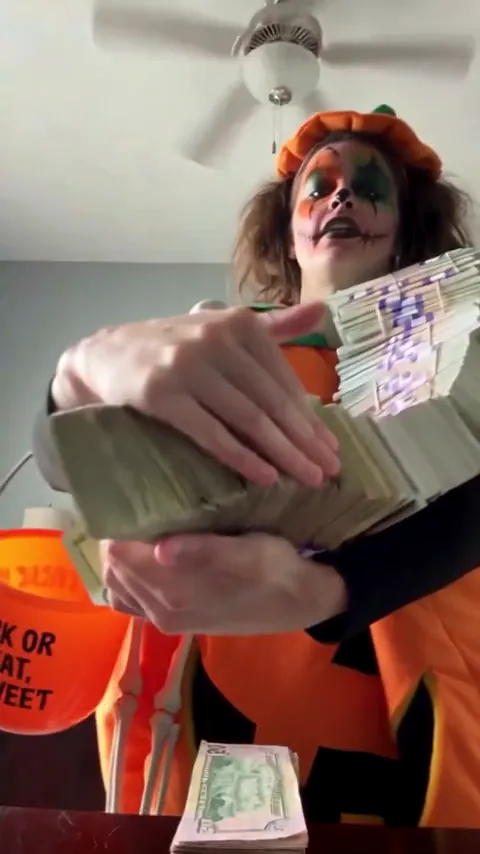
The Money Flex AI prompt is a shot list: a phone flat on a table looking up, an armful of prop banknotes pushed at the lens, a series of poses in order and a fan of bills that leaves only your eyes showing. Copy it below. If you would rather skip prompting, the Money Flex AI video generator builds the flex from one photo.
Key takeaways
- Five blocks: camera, subject, props, ordered poses, avoid list.
- The low phone-on-a-table camera is what makes it look like the trend.
- Keep the money as obvious props, never real currency.
- Add the sound when you post. Prompts cannot add it.
What does the prompt contain?
Paste this as one block, with your photo attached as the reference image:
Vertical video, photoreal. One locked-off take, no cuts.

Setting: a bedroom seen from a phone lying flat on a dark wooden table, aimed up at the person standing over it. A white ceiling with a fan sits behind their head. Daylight, soft and even. Nothing in the frame moves.

Person: whoever is in my reference photo, with the same face, hair and clothing. Expression flat and deadpan from first frame to last, mouth closed, looking down into the lens.

Money: heavy stacks of pale green prop banknotes, banded in purple paper. No currency marks, no serial numbers, no portrait.

Poses, in this order:
1. Arms wrapped around a bundle of stacks, driven down toward the lens.
2. A stack thrown at the camera.
3. A long chain of bills worn like a scarf.
4. A stack flipped slowly from one palm to the other.
5. A wide banknote fan spread over the lens, eyes and hair visible above the rim, held to the last frame.

Avoid: any smile or laugh, hands with extra or fused fingers, a second person, camera motion, cuts, captions, legible printing on the bills, a face that changes.
Every block earns its place. The camera line fixes the look, the subject line protects your face, the props line keeps the money reading as a joke, the ordered poses carry the rhythm and the avoid list handles the failures models default to.
Where do you paste it?
Into the prompt box of an image-to-video or reference-image tool, with your photo attached. Choose a vertical output and the longest clip the tool allows. If the tool has a separate negative prompt field, move the avoid line there. Two habits save retries: do not describe your face in words, because the photo already does that, and do not stack adjectives on the pose lines, because order is what the model needs.
Why does the camera line matter more than the moves?
A phone lying flat on a table and looking up is the trend’s signature. Get it wrong and the video becomes a person waving banknotes at eye level, which reads as an advert rather than a joke. The low camera also puts a ceiling and a fan behind your head, and that bland domestic background is half the humour: mansion money, bedroom ceiling. Once the camera is low and locked off, most takes read as the trend even if a pose lands late.
What variants can you swap in?
Change one line and keep the other four blocks:
- Payday version. Replace the fan with a drop: the fan opens, the face holds, then the banknotes fall onto the camera.
- Office version. Replace the camera line with a phone on a desk and a strip-lit office ceiling.
- Short version. For tools that cap the clip, keep the armful and the fan and cut the middle poses.
What stays fixed in every variant is the deadpan face and the prop money.
What do you change when a take goes wrong?
| Symptom | Change to the prompt |
|---|---|
| A smile or a laugh | Add “expressionless, mouth closed, no smile at any point” to the subject line |
| Camera at eye level | Start with “worm’s-eye view, phone flat on the table” |
| Camera drifts or cuts | Append “single locked-off shot” |
| Extra or melting fingers | Sharpen the source photo, then write “slowly, one stack only” into the pose |
| Bills look like real currency | Keep “movie-prop banknotes” and add “no readable text on the bills” |
| Face changes behind the fan | Add “same eyes and hair as the reference” |
Change one line at a time, so you learn which fix worked. A smiling source photo produces a smiling video, and a photo with hands in frame invites extra fingers, so fix those before you generate.
How do you get the same result without a prompt?
Upload one photo to the Money Flex AI video generator: it holds the camera, the poses and the props without any text from you. A 480p video costs 500 credits and a 720p HD video costs 1,500. The $9.99 pack holds 500 credits, the $19.99 pack 1,500 and the $29.99 pack 2,500. Packs are a one-time purchase and failed videos refund their credits. Either way, the money is prop money: publish it for the joke, never as evidence of earnings, a balance or an offer. The free routes are compared in free Money Flex AI video, and the photo to attach is covered in the best photo guide.
YupPop is an independent tool and is not affiliated with the creators of the original Money Flex videos.
FAQ
Is the Money Flex prompt free to use?
The text is free to copy. What may cost money is the tool you paste it into, since free tiers limit length, resolution or the number of generations.
Which tool handles the prompt best?
Image-to-video tools with a reference-image mode, because the photo carries the face and the prompt only has to carry the motion. Tools that only accept text struggle with a specific face.
Why does the model keep adding a smile?
Video models default to a friendly expression. Say “deadpan, mouth closed, no smile at any point” in the subject line and again in the avoid list, and use a neutral source photo.
Does the prompt produce the trend sound?
No. Many AI video tools generate their own audio or none. Add the Money Flex sound in the app when you post, then set the original audio to zero.
Is there a no-prompt route?
Yes. The Money Flex AI video generator takes one photo and builds the flex without any text from you.
Related guides
- How to make a Money Flex AI video
- Best photo for a Money Flex AI video
- Free Money Flex AI video
- Money Flex AI: CapCut vs AI generator