Money Flex AI: CapCut Template vs AI Generator
October 25, 2026
Want to star in the Money Flex meme? Turn your photo into it.Make my video →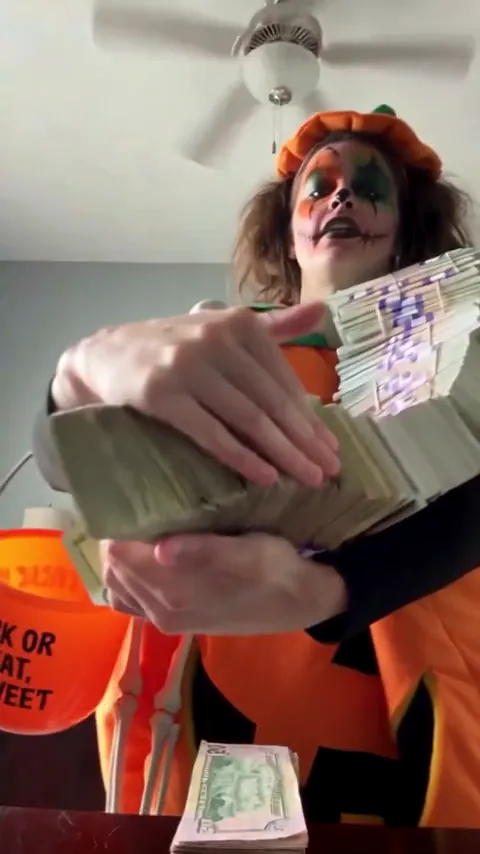
A CapCut template is better if you already filmed your own flex, because it only re-cuts footage you shot. An AI generator is better if you have no props, since it builds the flex from one photo. A template is an edit; a generator is a camera crew.
Key takeaways
- Template: your clips, someone else’s cuts and timing.
- Generator: the footage itself, from one photo.
- Filming with play money is the cheapest route.
- Combine them: generate or film, then finish in an editor.
What does a CapCut template give you?
Somebody else’s cuts, timing and text, with your clips dropped into the gaps. That is useful when you already have the raw material. Money Flex is one continuous low shot, so a template’s main job is to line your take up with the trend sound and add a caption that fits. What you cannot do is apply a template to a still photo and get a flex out of it.
What can an AI generator do that a template cannot?
Produce the footage itself: the armful, the throw, the scarf of bills and the fan, from one photo of you.
| CapCut template | AI tool with a prompt | One photo on YupPop | |
|---|---|---|---|
| Starts from | Your own clips | Your photo plus text | Your photo |
| Your face | Real, it is your footage | Close, can drift | Held from the photo |
| The poses | Only the ones you filmed | Often, after retries | Built in |
| Props needed | Your own play money | None | None |
| Sound | Added in the app | Add it yourself | Add it when you post |
| Cost | Play money | Free tier, then paid | 500 credits per 480p video |
If you never filmed the armful, the throw and the fan, a template has nothing to arrange, and no editing will add banknotes you did not hold.
Which route is cheapest?
Filming it yourself and editing in CapCut costs nothing beyond a pack of play money. An AI tool with a free tier is next, if you accept a watermark or a short clip while you learn the prompt. The one-photo route is the most predictable: a 480p video costs 500 credits and a 720p HD video costs 1,500. The $9.99 pack holds 500 credits, the $19.99 pack 1,500 and the $29.99 pack 2,500, about $6.00 per 480p video at the largest pack. Packs are a one-time purchase, credits do not expire and failed videos refund their credits.
Which route keeps your face closest?
Real footage, because it is your face rather than a reconstruction. Among the AI routes, a clear face-and-shoulders photo holds the likeness best, and the face drifts most at the fan, which leaves only the eyes. The photo guide covers the framing that survives that ending. A prompt does not fix a weak photo: if the first take looks like a relative rather than you, change the image before you change the words.
Can you combine the routes?
Yes, and it is often the best answer: generate or film the flex, then finish it in CapCut. Trim the opening so the armful is already moving at the lens, hold the final fan because it is the punchline, and add one caption that sets up the joke. Leave the colours alone: soft daylight and pale walls are the look, and a heavy filter makes prop banknotes read as cheap plastic.
What about the sound on each route?
Add the trend sound in the app on every route. If your file already has audio and you also pick the sound from the platform, you get two copies at once, so lower the original to zero. The taps are in the Money Flex sound guide.
Start from the Money Flex AI video generator if you have no footage, or read how to make a Money Flex AI video. The free routes are in free Money Flex AI video. YupPop is an independent tool and is not affiliated with CapCut or the creators of the original Money Flex videos. The money in the trend is prop cash.
FAQ
Do CapCut templates for this trend exist?
Creators link templates under popular sounds, so they can exist. A template re-cuts footage you supply, so you still need to film the poses yourself before it is any use.
Can CapCut make the flex from a photo?
An editing app’s AI video feature can attempt it with a reference photo and a prompt, but a template cannot, because templates arrange clips rather than generate them.
Which route is cheapest for one video?
Filming it yourself with play money. A free AI tier can cost nothing but may add a watermark or a shorter clip. The one-photo route is 500 credits for a 480p video.
Which version looks most like me?
Real footage of you, by definition. Among the AI routes, a bright face-and-shoulders photo is the variable you control.
Can I edit a generated video in CapCut?
Yes. The export is a plain MP4, so you can trim it, caption it and attach the trend sound in any editor.
Related guides
- How to make a Money Flex AI video
- Best photo for a Money Flex AI video
- Free Money Flex AI video
- Money Flex AI prompt