Money Flex Sound on TikTok and Reels: How to Add It
October 25, 2026
Want to star in the Money Flex meme? Turn your photo into it.Make my video →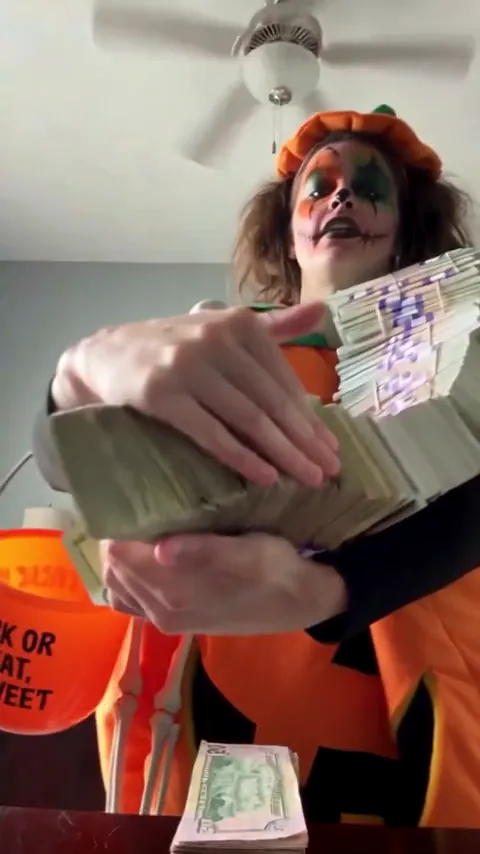
The Money Flex sound is an original audio track that plays under the trend’s videos, and we could not confirm its title or artist. You add it by tapping the sound name on a Money Flex video, choosing the option to use that sound and then posting your clip. If you are short of footage, make a Money Flex video from one photo first.
Key takeaways
- The sound is an original audio with no confirmed title or artist.
- Searching by name is unreliable. Start from a video that uses it.
- Set your file’s original audio to zero so two copies do not overlap.
- Turn on the app’s AI-generated label for an AI version.
What is the Money Flex sound?
An original audio upload: a slow, heavy beat that plays under most of the trend’s videos. That is why no title turns up in search. Original sounds belong to the account that uploaded them, so they are identified by the video rather than by a release. We name no song, because we could not confirm one. Treat the audio as part of the format and take it from a clip you like.
Why add it in the app?
Adding it in the app does three things a baked-in track cannot. It links your post to the sound page, where people browse every video using that audio. It uses the platform’s own copy, which lowers the chance of a mute. And it starts where everyone else’s version starts, which helps the beat land as the armful reaches the lens. A clip carrying only its own audio cannot be discovered through the trend.
How do you find the sound if search fails?
Find it on any Money Flex video, then save it so the next post takes two taps. On TikTok, tap the sound name under a trend video and choose the option to use it; from the sound’s page you can add it to favourites. On Instagram, tap the audio name on a Reel and use the audio, or save it and pick it from Saved later. On Shorts, tap the sound name and start a Short with it.
How do you land the fan on the beat?
Start the sound where other creators start it, then nudge the start until the strongest hit lands as the fan of bills covers the frame. If the timing is off, move the sound rather than trimming your video: open the sound’s trim control and shift its start a fraction earlier or later. A clip from a free AI app is not cut to any beat, so there you trim the clip until the fan opens on the hit.
What if the sound is muted or missing?
- Business account. Business profiles usually see a trimmed music library. A personal or creator account may show the sound.
- Region or removal. Original audio can be restricted by country or removed by its owner.
- Old app version. Updating the app fixes sounds that older builds hide.
- Still stuck. Post with the audio already inside your file. The deadpan face still reads.
Do you have to label an AI video?
You should label any AI version you post publicly. TikTok has an AI-generated content setting at upload, and using it is the honest default when the person on screen was generated from a photo. Money Flex is a joke about fake money: never post it as proof of income or as an offer.
Keep one file for every platform
Use the original MP4 on each app instead of downloading your own post from another one, which can stamp another platform’s mark on the file and shave off quality. Pick the sound again inside each app, because one chosen on TikTok does not travel to Reels or Shorts. The fan of bills makes a good cover frame. For the full process, see how to make a Money Flex AI video, and for the meme and its poses, the Money Flex meme guide.
YupPop is an independent tool and is not affiliated with the creators of the original Money Flex videos.
FAQ
What is the Money Flex sound called?
It has no confirmed title. It is an original audio upload rather than a released track, so it is identified by the video that uses it. Take it from a Money Flex video instead of searching a catalogue.
Does the one-photo video already include the sound?
Do not count on it. Music rights differ by platform, so add the trend’s sound from a Money Flex video when you post.
How do I stop the sound playing twice?
Turn the original audio to zero in the editor’s volume controls and leave the added track at full level. Two copies at once sound like an echo.
Can I use a different song instead?
You can, but viewers recognise the trend by its audio, and clips that swap the sound tend to sit outside the trend’s sound page.
Does the sound work on YouTube Shorts too?
Yes. Start from a Short that uses the sound, or add audio from the Shorts library. Check the volume balance before you publish.
More from the blog
- Money Flex Meme: The Deadpan Cash Trend, Poses, Pics and Songs
- How to Make a Money Flex AI Video From One Photo: 3 Phases
- Best Photo for a Money Flex AI Video: Face and Shoulders, One Photo
- Free Money Flex AI Video: Ways to Do It Without Paying
- Money Flex AI Prompt (Copy and Paste) for Image-to-Video Apps
- Money Flex AI: CapCut Template vs AI Generator