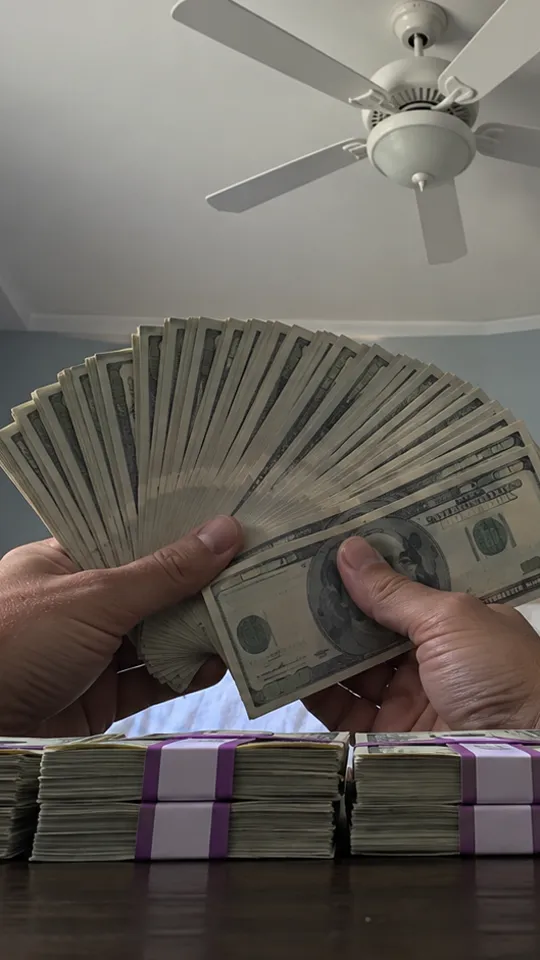
The Money Flex AI video generator turns one photo into a vertical MP4 of you doing the viral deadpan cash flex: you push a pile of prop cash at the lens, throw a stack, wear the bills like a scarf and hide behind a fan of money. Choose 480p or 720p HD, no watermark, from $9.99 one-time.
Original reference videoAutoplay · sound off
Your Money Flex video · saved in My Videos on this browserDownload MP4 ↓
Original reference clip · Preview the moves before uploading your photo.
What is the Money Flex AI trend?
A deadpan TikTok trend filmed from one low phone shot: someone pushes armfuls of cash at the camera, throws a stack, wears a chain of bills like a scarf and ends behind a fan of money with only their eyes showing. The money is props; the joke is the straight face.
Can I make the Money Flex video with my own photo?
Yes. Upload one clear photo and the AI (Seedance by ByteDance) generates a new video of you doing the Money Flex, following the reference clip. Failed videos refund their credits, and we don't store your photo.
Make your Money Flex video
Upload a photo, then choose the quality.
▧
1
Add your photo
Upload one clear photo of a person (JPG, PNG or WebP); images over 10 MB are automatically compressed.
2 · Quality
Your recent videos
Videos started in the last 24 hours. Up to 3 can be made at the same time. Finished videos are saved to My Videos on this browser and stay there until you clear site data.
How to make a Money Flex AI video.
Three steps from your photo to a ready-to-post MP4.
↥
01 · UPLOAD
Choose your photo
Upload a clear photo of one person to do the cash flex.
▣
02 · CUSTOMIZE
Pick your quality
480p (500 credits) or 720p HD (1,500 credits). You can leave the page while it renders.
↓
03 · SAVE
Download and share
Your video is saved in My Videos on this browser. Download the MP4 to keep a copy.
What you can make with the Money Flex AI video generator.
Celebrate payday
The perfect reply to payday, a bonus, a tax refund or any small win.
Prank a friend
Make your broke roommate the richest-looking person on the feed and send it to the group chat.
Birthdays and roasts
Turn the birthday person into a deadpan millionaire and play it at the party.
Meme pages and creators
Post your take while the Money Flex sound is still trending, with a face your followers know.
Tips for a better Money Flex video.
One person per photo. With several faces the AI has to guess who should take the lead.
Face clear and well lit. Daylight or a bright room beats a dark street photo. No masks or hands over the face.
Half-body or full-body. The AI keeps your outfit and proportions, so the moves look natural.
No filters. Beauty filters and cartoon effects make the result look less like you.
A deadpan trend where someone flexes armfuls of prop cash at a low phone camera, throws a stack, wears the bills like a scarf and hides behind a fan of money.
Is the money in the video real?
No. It's prop cash for a joke video. Post it as a joke, never as proof of income or an offer of any kind.
What happens in the Money Flex video?
You push a pile of cash at the lens, throw a stack at the camera, wear a chain of bills like a scarf, count a stack and end behind a fan of bills with only your eyes showing.
Do I keep my own clothes?
Yes. The AI keeps the outfit from your photo.
Which photo works best?
Face and shoulders, straight on, in good light, with nothing over your eyes, since your eyes are what show over the fan of bills at the end.
Does my video include the sound?
The AI follows the original rhythm, but music rights differ by platform, so add the trending sound when you post on TikTok or Reels.
Can I put my own face in the Money Flex video?
Yes. Upload one clear photo and the AI recreates the same moves and scene with you in the lead.
Can I make it free?
Signing up is free, but each video uses credits from a one-time pack, starting at $9.99. Failed videos refund their credits automatically.
Can I turn my video into a GIF?
Yes. Download the MP4 and convert it with any free video-to-GIF tool.
What if my video fails?
Its credits go back to your balance automatically, so you can try again with another photo.
Where are my videos saved?
In My Videos, in the browser you made them in. Finished videos stay there until you clear site data; they don't sync to other devices, so download the MP4s you want to keep. If you leave while a video is still rendering, come back within 24 hours and it will be collected into My Videos.
What happens to my photos?
We don't store them. They are sent to our video-generation provider only to make your video and are deleted there as soon as it is finished. Only upload photos of yourself or of people who agreed.
How do payments work?
A one-time payment through our secure checkout partner Waffo, no subscription. We never see your card details. Unused credits can be refunded within 7 days.
Is this an official Money Flex product?
No. YupPop is an independent fan-made tool and is not affiliated with the original creators or the social platforms.