Best Photo for a Money Flex AI Video: Face and Shoulders, One Photo
October 25, 2026
Want to star in the Money Flex meme? Turn your photo into it.Make my video →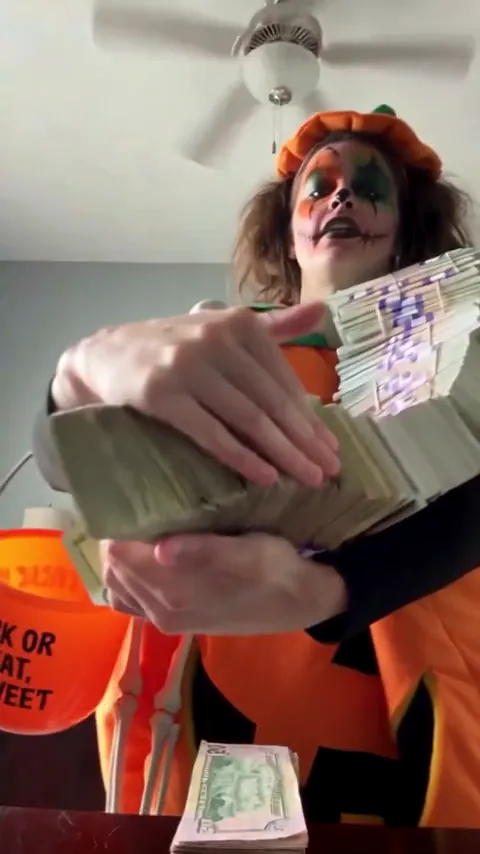
A face-and-shoulders photo taken straight on in soft light works best for a Money Flex AI video: whole face visible, nothing over the eyes, one person in frame. That photo is the only input the generator gets, so it decides how much the finished video still looks like you.
Key takeaways
- Face and shoulders, straight on, one person.
- Soft daylight from the front. No backlight or flash.
- Eyes fully visible. They are what shows over the fan of bills.
- A photo of you, or of an adult who agreed. No celebrities or minors.
What makes a photo work for this trend?
The face is large, evenly lit and pointed at the lens, with your shoulders in frame. Size matters because the AI rebuilds a face through a lot of movement, including a moment when only your eyes are visible. Soft daylight keeps the eyes readable; a window in front of you beats a lamp behind you, and a phone flash tends to flatten the face. Straight on matters because the camera looks up from a table in the finished video, so an eye-level photo translates cleanly, while a profile asks the AI to invent the half of your face it cannot see.
Why do your eyes matter more than the rest of the frame?
The last pose covers everything else: a fan of bills fills the frame and your eyes and hair are the only features left above it. That ending is the punchline and the frame most people screenshot for a PFP. If sunglasses, a cap brim or a fringe hides your eyes in the source photo, the ending has nothing to show. A quick check: cover everything below your eyebrows in the photo and ask whether you would still recognise yourself. If not, choose another image before you spend 500 credits.
What should you leave out?
| In the photo | Why it works or fails |
|---|---|
| Face and shoulders, straight on | Works: a clear, front-facing face to keep. |
| Soft daylight from the front | Works: even light keeps the eyes readable. |
| Sunglasses | Avoid: your eyes are the only thing showing at the end. |
| A hat with a brim | Avoid: shade across the eyes reads as a missing face. |
| A group of friends | Avoid: crop to one person or the AI may pick the wrong face. |
| A hand near your cheek | Avoid: hands are the hardest thing to keep clean. |
Can you use a group photo or an old photo?
A group photo can be cropped to one person: crop tight on your own face and shoulders first, because leaving several faces in the frame makes the AI choose. An older photo is fine as long as it still looks like you today, since the video goes out under your name. Use only photos you have the right to use, and never a celebrity or anyone under 18.
What are the common photo mistakes?
- Tiny face. A face in the far corner of a wide shot gives the AI little to hold. Move closer or crop.
- Strong smile. Money Flex is deadpan, so a closed, neutral mouth works better than a grin.
- Heavy filters. They change your face before the AI even starts, which hurts likeness.
- Tilted head. Keep it level and centred.
What does a retry cost?
A 480p video costs 500 credits and a 720p HD video costs 1,500. The $9.99 pack holds 500 credits, exactly one 480p video; the $19.99 pack holds 1,500 and the $29.99 pack holds 2,500. A pack is a one-time purchase, credits do not expire and a failed render refunds its credits, but a video that renders and looks wrong still uses them, so a good photo saves credits.
Next, read how to make a Money Flex AI video for the three phases, then open the Money Flex AI video generator. YupPop is an independent tool and is not affiliated with the creators of the original Money Flex videos. The money in the trend is prop cash, not real currency.
FAQ
Do I keep my own clothes in the video?
Yes. The AI keeps the outfit from your photo, along with your face and hair. There is no wardrobe step, so the top you wear in the upload is the top you flex in.
Can I use a mirror selfie?
A plain front-camera photo works better. In a mirror selfie the phone can block part of the face, which hurts the likeness.
Do I need more than one photo?
No. The generator takes exactly one photo. Extra angles are not needed because the moves and the camera come from the trend.
What if the video looks nothing like me?
Retry with a brighter, closer, front-facing photo. A small, dark or turned-away photo gives the AI less detail to hold on to.
Is there a minimum age for the photo?
The photo has to show an adult. No one under 18 and no celebrities or public figures.
Related guides
- How to make a Money Flex AI video
- Free Money Flex AI video
- Money Flex AI prompt
- Money Flex AI: CapCut vs AI generator