How to Make a Dime Dime Baby AI Video From One Photo (2026 Guide)
October 22, 2026
Want to star in the Dime Dime Baby meme? Turn your photo into it.Make my video →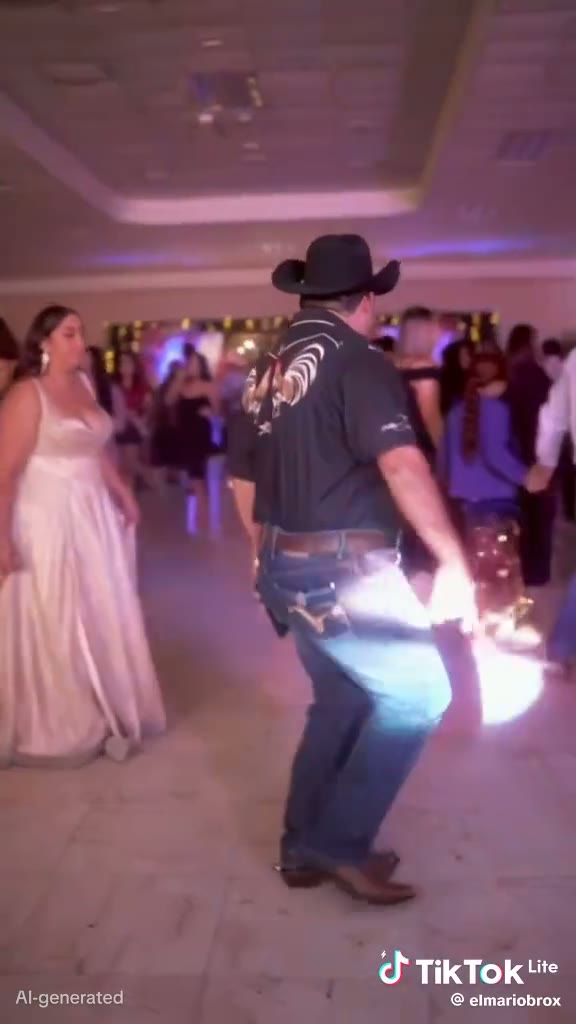
You can join the Dime Dime Baby trend without dancing in public. With an AI video generator, one photo becomes a vertical party-dance clip in which you walk in, groove, stare down the camera and point. Here is how to do it, step by step.
Key takeaways
- You need one clear photo of one person, ideally half-body or full-body.
- Upload it to the Dime Dime Baby AI video generator, choose 480p or 720p HD, and generate.
- Cost: 500 credits (480p) or 1,500 credits (720p HD); packs start at $9.99. Failed videos are refunded.
- Post it with the BbY WOW sound and label it as AI-generated.
Step 1: Which photo should I use?
The photo decides how much the result looks like you. Follow these rules:
- One person per photo. With several faces the AI has to guess who should be the dancer.
- Face clear, front-facing and well lit. The stare into the camera is the whole joke, so your eyes need to be sharp. No sunglasses, masks or heavy shadows.
- Half-body or full-body. The AI keeps your build and proportions, so the strut looks natural instead of a floating head.
- No beauty filters or cartoon effects. They make the result look less like you.
- Your own photo, or one you have permission to use. Do not upload strangers, celebrities or minors.
Step 2: How do I generate the video?
- Open the Dime Dime Baby AI video generator and sign in.
- Upload your photo in the “Cowboy dancer” slot.
- Choose 480p to test a photo cheaply, or 720p HD for the clip you will post.
- Press Generate. You can close the tab; the video keeps rendering.
- Open My Videos and download the MP4.
Which method is best for you?
| Method | Best for | Trade-off |
|---|---|---|
| AI generator (one photo) | Anyone without dance footage | Uses credits |
| CapCut template | People who already filmed themselves | Does not create new footage |
| Film it yourself | Confident dancers at a real party | Needs the right moment and nerve |
More on templates: Dime Dime Baby CapCut template vs AI.
Why does my video look wrong?
- Face doesn’t look like me: use a sharper, front-facing photo without filters.
- Wrong person replaced: crop the photo so only one person is in it.
- Body proportions look off: use a half-body or full-body shot instead of a close-up selfie.
- Video failed: the credits go back to your balance automatically; try another photo.
How do I post it on TikTok, Reels or Shorts?
The MP4 is vertical, so it fits all three. Upload it, then add the official BbY WOW sound from the app’s library and lower the original audio. Use tags like #dimedimebaby, #bbywow and #aivideo, and switch on the platform’s AI-generated label. A caption such as “bella como ninguna 🤠” works well; see why.
Is it safe and allowed?
Only upload photos of yourself or of people who agreed. We do not store your photos: they are sent to our video provider only to make your video and deleted there when it is done. Your finished videos are saved in your browser, so download the ones you want to keep.
Prefer to film it yourself?
Grab a friend and a phone at your next party and copy the walk, the groove and the stare. For the full look, see the Dime Dime Baby costume guide.
Conclusion
One good photo, two clicks and the BbY WOW sound are all it takes to be the star of the Dime Dime Baby trend. Want the backstory first? Read the Dime Dime Baby meme explained.
FAQ
Do I need to dance or film anything?
No. Upload one photo and the AI recreates the party dance with you as the dancer.
How much does a Dime Dime Baby AI video cost?
One-time credit packs from $9.99, no subscription. A 480p video costs 500 credits and a 720p HD video 1,500 credits. Failed videos refund their credits automatically.
Can I make it for free?
Creating an account is free, but every video uses credits. The cheapest way to test a photo is 480p.
How long does it take?
Usually a few minutes. You can leave the page while it renders and collect the video in My Videos within 24 hours.
Does the video include BbY WOW?
Add the BbY WOW sound when you post on TikTok or Reels. Using the platform’s own sound keeps the audio licensed and joins the trend page.
Can I use someone else’s photo?
Only with their permission. Do not upload strangers, celebrities or minors.
Related guides
- Dime Dime Baby CapCut template
- Dime Dime Baby Halloween costume
- Best Dime Dime Baby AI video generators
More from the blog
- Dime Dime Baby Meme Explained: The Bby Wow Guy, the Song and the AI Trend (2026)
- Dime Dime Baby Song: Who Sings BbY WOW? Release Date, Album and Charts (2026)
- Dime Dime Baby Lyrics: BbY WOW Hook in Spanish and English (Letra + Meaning)
- Dime Dime Baby Meaning: What “Dime” Means in Spanish (and Why It’s Not About a 10)
- Ella Como Ninguna or Bella Como Ninguna? The Dime Dime Baby Lyric Explained
- Clarent “Dime Baby” vs “Dime Dime Baby” (BbY WOW): Which Song Is the TikTok Trend?