How to Do the Ozil Goal AI Trend: 5 Beats, 1 Photo
October 25, 2026
Want to star in the Ozil Goal meme? Turn your photo into it.Make my video →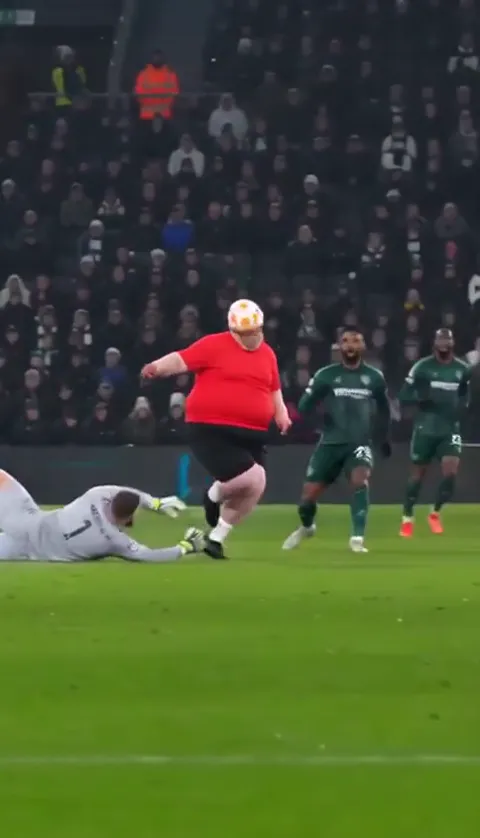
You make an Ozil goal AI video by uploading a single front-facing photo to the Ozil goal AI generator and letting the tool put you inside the chip-and-wait goal. The job is one upload and one wait: you do not need a pitch, a keeper or a camera. This guide covers what to prepare, which five beats to check before you post, and how to fix a take that comes back wrong.
Key takeaways
- You need one photo of one person and some credits. Nothing to film.
- Check the five beats in order: pickup, carry, chip, wait, finish.
- Likeness comes from the photo, so retake a bad photo instead of retrying the same one.
- 480p = 500 credits, 720p HD = 1,500 credits. One-time packs: $9.99 (500 credits), $19.99 (1,500) or $29.99 (2,500), no subscription.
What do you need before you start?
- A photo of yourself. Face toward the camera, top half in frame, good light, no sunglasses and nobody else in the shot.
- Credits. A 480p video uses 500 credits, and the entry pack is $9.99.
- The right clothes. You score in what you wear in the photo, so a photo in a football shirt is how you end up playing in one.
Which photo should you upload?
A front-facing photo with your whole face lit and your top half visible works best, because the tool copies your face, hair, build and clothes from it. Crop a group shot down to you alone, and keep sunglasses, hands and hair off your eyes. The photo is the only part of the result you control, so it is worth two minutes: a sharp photo in daylight gives a sharper face in the video, while a dark, tilted or crowded one gives a face that drifts. The photo guide has the full list.
Which five beats should the video hit?
Five beats have to land in order. The chip is the third, and it is the one the whole trend is built on.
- The pickup. You take the ball and lift your head before your feet do anything.
- The carry. You push the ball ahead and run at the defence while the keeper starts to come out.
- The chip. No backlift: one soft touch lifts the ball over the keeper as he goes down.
- The wait. The ball bounces, the first defender slides in and misses, you drag it back and the second slides past too.
- The finish and the turn. A gentle side-foot into the empty net, then you wheel away without shouting at the crowd.
Check the order before you download. A take that turns the chip into a low shot is worth regenerating, because the order is the joke.
How do you generate it?
Open the Ozil goal AI video generator, add your photo, choose 480p or 720p HD and press Generate. It usually takes a few minutes, and you can leave the page while it renders. When it is ready, download the MP4, add the trend’s sound if you like (see how to add the Ozil goal sound) and post it as a fan video.
How do you film the same goal with friends?
- Put the phone high and to the side, the way a TV camera sits in the stand.
- Start your run from the middle of the pitch, not the edge of the box, so the carry reads as a run.
- Wait for the keeper to commit. The chip only works if he is already going down.
- Lift the ball with the inside of the foot and keep running underneath it.
- Let it bounce, then stop and wait while each defender slides past, and roll it into the empty net.
- Turn away and slide on your knees. Do not sprint to the corner.
Wet grass makes the slide work and the landing hurt, so wear long sleeves and shoot two takes.
What do you do when a take comes back wrong?
- You shoot instead of chipping: regenerate, or try the prompt version in our Ozil goal AI template, which spells out the chip.
- The face drifts: retake the photo in daylight, face to the camera.
- The keeper looks like you: regenerate with a photo that shows only you.
- The celebration is missing: accept it, or post the clip as it is, since the wait and the finish carry the joke.
A failed video refunds its credits automatically, so a bad take costs you time rather than money.
What does it cost?
480p = 500 credits, 720p HD = 1,500 credits. One-time packs: $9.99 (500 credits), $19.99 (1,500) or $29.99 (2,500), no subscription. Credits do not expire. Looking for a no-card route? Read how to make the Ozil goal AI video for free, and for the story behind the goal see the Ozil goal meme explained.
YupPop is an independent tool and is not affiliated with Mesut Özil, Arsenal, Ludogorets or UEFA. Label your clip as AI-generated and as a fan video.
FAQ
How do I make an Ozil goal AI video?
Upload one clear photo of yourself to the Ozil goal AI video generator, choose 480p or 720p HD and press Generate. The video usually takes a few minutes.
Do I need a video of myself to start?
No. The generator takes one still photo. The movement and camera come from the trend, and the only things taken from you are your face, build and the clothes in the photo.
Can I make the video in a football shirt?
Yes, if you take the photo in one. You play in the clothes from your photo, so wear what you want on the pitch. A plain shirt is safer because crests often come out garbled.
What if the first take looks nothing like me?
Likeness depends on the photo. Retake it in daylight with your face square to the camera and the top half of your body in view, then generate again.
How do I post it without calling it real?
Turn on the platform’s AI-generated label, say fan video in the caption and never present the remake as match footage.
How much does it cost?
A 480p video uses 500 credits and 720p HD uses 1,500. Packs are one-time purchases at $9.99, $19.99 or $29.99, not a subscription. Failed videos refund their credits.
Related guides
- Best photo for an Ozil goal AI video
- How to make the Ozil goal AI video for free
- Ozil goal AI template and prompt
- CapCut vs AI for the Ozil goal
- Ozil goal sound on TikTok and Reels