How to Make the Ozil Goal AI Video Free (vs CapCut, Higgsfield and Viggle)
October 24, 2026
Want to star in the Ozil Goal meme? Turn your photo into it.Make my video →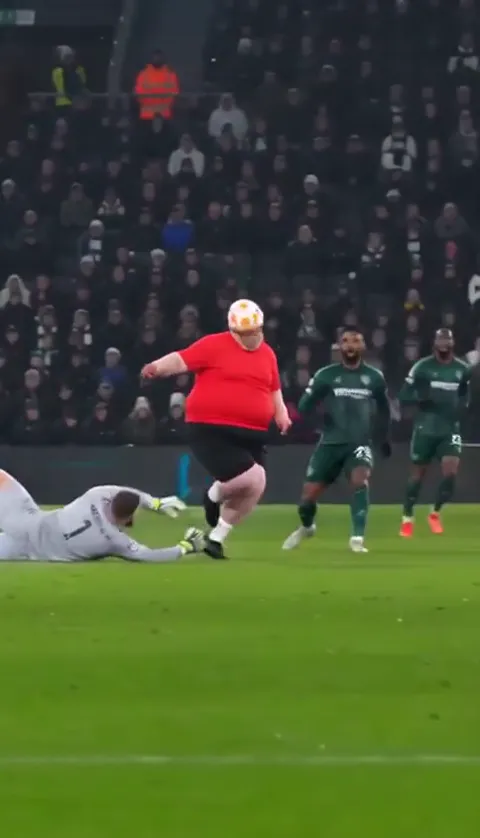
The fastest way to make the Ozil goal AI video is to upload one photo to the Ozil goal AI generator. That costs credits. If you want it free, you have two real options: film it with friends, or try a general AI video app’s free tier with a prompt. Here is what each route gives you, honestly.
Key takeaways
- Free: film it yourself, or a general AI app’s free tier plus a prompt. Expect retries.
- CapCut template: edits clips you already have. It cannot invent the goal.
- One photo here: 480p = 500 credits, 720p HD = 1,500 credits. One-time packs: $9.99 (500 credits), $19.99 (1,500) or $29.99 (2,500), no subscription.
- No watermark, failed videos refund their credits and your photo is not stored.
Is there a free Ozil goal AI generator?
Not really. Making video with AI costs real computing time, so most tools that call themselves free either limit you to short, watermarked tries or ask you to pay before you download. Check the price before you upload. Our generator is up front about it: signing up is free, and a 480p video uses 500 credits from a $9.99 pack.
The routes side by side
- Film it with friends: free and the only version where you really scored. You need a keeper, two friends happy to slide and someone filming from the side.
- CapCut template: free and quick, but it only cuts your own clips to music. No clips of you chipping a keeper, no Ozil goal.
- General AI video apps (Higgsfield, Viggle and similar): can animate you from a photo with a prompt or a motion reference. They do not know this trend, so you describe every beat, retry when the defenders forget to slide and add sound later. Free tiers and watermark rules change, so check each app.
- The Ozil goal AI generator: one photo in, the whole goal out, with crowd and net sound. Paid with credits.
How to film the Ozil goal with friends
Get your filmer as high as is safe at the side of the pitch, like a TV camera. Run at the keeper, chip it as they come out, take the bounce, then stop and wait while each defender slides past. Finish gently into the net. On artificial turf, slide in long sleeves or just dive and miss; it still works.
Using a general AI video app
Open the app’s image-to-video mode, attach a clear photo of yourself and paste a timed description of the goal. Our Ozil goal AI template and prompt is written for exactly this. Two things go wrong most often: the AI shoots straight after the chip, and the defenders never slide. Spell out the wait, and if the app makes short clips, split the goal into two and join them.
Make it from one photo here
- Just you in the photo. With several faces the AI has to guess who should score.
- Face toward the camera, in good light. No sunglasses, masks or heavy shadows.
- Top half or full body in view. You play in the clothes from the photo, so wear what you want on the pitch.
- No beauty filters or cartoon effects. They make the result look less like you.
- Your own photo, or one you have permission to use. No footballers, celebrities or minors.
Open the Ozil goal AI video generator, add your photo, choose 480p or 720p HD and press Generate. It usually takes a few minutes, and you can leave the page while it renders. Download the MP4, post it with the trend’s sound or your own commentary and label it as AI-generated.
Which should you pick?
If you play five-a-side anyway, film it: it is free and it is real. If you enjoy tinkering, try a free AI app with our prompt. If you want the finished goal tonight from one selfie, use the generator. Curious about the original? Read the Ozil goal meme explained. YupPop is not affiliated with Mesut Özil, Arsenal, CapCut, Higgsfield or Viggle.
FAQ
Is the Ozil goal AI generator free?
Signing up is free, but each video uses credits from a one-time pack, starting at $9.99 for 500 credits, which makes one 480p video. Failed videos refund their credits.
How can I make the Ozil goal video for free?
Film it with a few friends on a real pitch, or try a general AI video app’s free tier with a written prompt. Both cost time and retries instead of money.
Can CapCut make the Ozil goal AI video?
A CapCut template only re-edits footage you already have. It cannot put you on a floodlit pitch from a photo.
Can I use Higgsfield or Viggle for the Ozil goal?
You can try. General AI video apps can animate a photo from a prompt or a reference, but they do not know this trend, so expect to write the shot yourself and retry. Check each app’s current free limits and watermark rules.
How long does the Ozil goal AI video take?
Usually a few minutes. You can leave the page; finished videos appear in My Videos on the same browser.
Do I keep my own clothes?
Yes. You play in whatever you wear in your photo.