Ozil Goal Sound on TikTok and Reels: What to Use and How to Add It
October 25, 2026
Want to star in the Ozil Goal meme? Turn your photo into it.Make my video →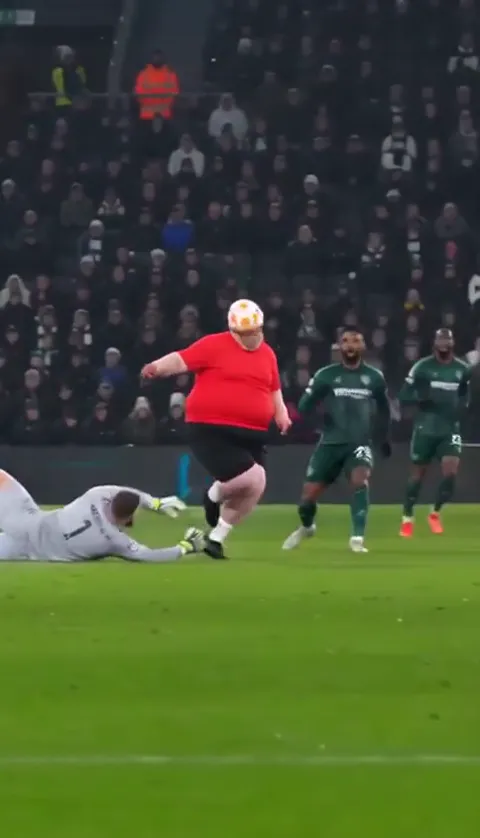
There is no single official Ozil goal sound. Most posts keep the stadium audio that comes with the clip, or borrow the audio from a chip-and-wait video they liked on TikTok. This is one trend where silence works: crowd noise plus the ball hitting the net does more than a song would. If you want something else, this guide covers the trend’s own sound, your own voice, and how to mix them.
Key takeaways
- No official sound: keep the stadium audio, use a trend sound or add your own voiceover.
- Land the drop on the finish, when the ball reaches the net.
- Turn the original down, not off, so the net stays audible.
- Never reuse broadcast commentary. Record your own.
Is there one official Ozil goal sound?
No, which is why the hashtag looks messier than most. Using a sound from another post puts your video on that sound’s page, beside every clip that used it, which is where people browse for more of the trend. Keeping the original audio starts a new sound page under your clip instead. There are three simple choices:
- Keep the stadium: post with the original sound. Good for looking like real TV.
- Use the trend’s sound: tap a sound you like, then use it. Good for showing up beside the trend.
- Add commentary: record a voiceover in the app. The funniest version.
What is in the AI file?
The clip from the Ozil goal AI generator comes with its own generated audio and no song, so anything you add sits on top of stadium-style noise with no tempo to clash with. That mix is worth keeping even when you add something, because the net is the payoff: the ball rolling into the empty net after the wait is the moment the whole clip is building to, and a track that buries it removes the point. Listen to your clip first, since generated audio can differ from take to take.
How do you add a sound on TikTok, Reels and Shorts?
On TikTok. Find an Ozil goal video whose audio you like and tap the sound name at the bottom. Tap the option to use this sound, then pick your video. Or upload first and use Add sound in the editor.
On Instagram Reels. From a Reel you liked, tap the audio name and choose Use audio, then add your video. Or start a new Reel, add the clip, and search from Add audio.
On YouTube Shorts. From a Short, tap the sound name and use it, or create the Short first and pick a sound from the editor. Keep the stadium audio low under either.
Where should the sound land?
The big moment belongs on the finish. Everything before it is build:
- At the start, the pickup and the carry: crowd only, or a held note or riser.
- At the chip: let the crowd lift as the keeper goes down.
- At the wait and the finish: the drop lands as the ball crosses the line.
- At the turn: let the crowd carry it out.
After picking a sound, tap its name or the trim icon to choose which part plays. Drag until a strong beat sits on the moment the ball crosses the line, then play it through with the original audio low. This matters more here than in a dance trend, because the clip has a punchline rather than a beat grid.
How do you mix the two tracks?
Turn the original down rather than off, so the crowd and the net stay audible under whatever you added. With a song, set the original low. With commentary, keep it nearer the middle, so it sounds like a broadcast with a voice over it. A voiceover suits this trend because the joke is the wait: stay quiet through the run, go flat and slow as the ball drops, then say nothing on the turn. Never reuse a broadcaster’s commentary. Write your own lines, because someone else’s audio can get the post muted or taken down.
Why does a sound sometimes go missing?
Business and brand accounts often get a smaller library, and some sounds are blocked in some countries. If yours is not there, post with the stadium audio or record a voiceover. If a post is muted after it goes up, repost it with a sound from the app’s own library. Keep the export before you upload, so a mute costs a re-upload rather than a re-render.
Label it
Turn on the platform’s AI-generated content label and say fan video in the caption. The goal is Mesut Özil’s from 2016, not yours from last night. The beat-by-beat guide shows how to make the clip, and the Ozil goal meme explained covers the original. YupPop is an independent tool and is not affiliated with Mesut Özil, Arsenal, Ludogorets or UEFA.
FAQ
What sound do most Ozil goal posts use?
There is no single official sound. Posts use several different audios, and many simply keep the stadium noise. Tapping the sound on a video you liked is the fastest way onto the same sound page as the rest of the trend.
Does the AI video come with music?
The generator makes its own stadium-style audio and does not add a song. Listen to your clip, then add the trend’s sound or your own voice when you post.
Where should the drop land?
On the finish, when the ball rolls into the empty net. Trim the track until its strongest moment lands there and let the crowd carry the build before it.
How do you add commentary to the clip?
Use the voiceover tool in the TikTok, Reels or Shorts editor, record two or three takes in your own words and keep the original audio underneath.
Can you use the real 2016 commentary?
No. Broadcast commentary belongs to someone, and reused commentary is a common reason a post gets muted. Record your own words instead.
Should the original sound be turned off?
Keeping it low beats muting it, because the ball hitting the net is the punchline. Check that it still reads on a phone speaker.
Related guides
- How to do the Ozil goal AI trend
- Best photo for an Ozil goal AI video
- How to make the Ozil goal AI video for free
- Ozil goal AI template and prompt
- CapCut vs AI for the Ozil goal