A2O LITE NEON AI Prompt (Copy and Paste): White-Studio Intro
October 25, 2026
Want to star in the A2O LITE NEON meme? Turn your photo into it.Make my video →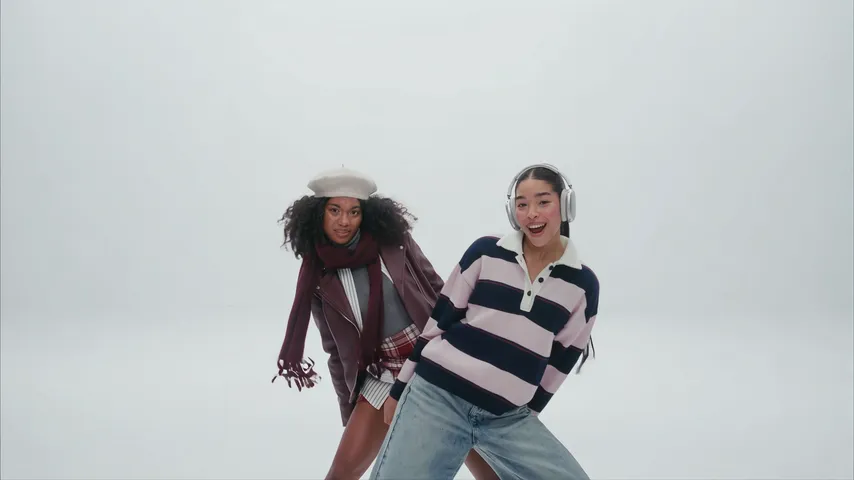
An A2O LITE NEON AI prompt is a step-by-step description of the white-studio intro that tells an image-to-video app to make a new video of you doing it. Below is a free prompt to paste, what each line does, and fixes for the usual mistakes. If you would rather skip prompting, the A2O LITE NEON AI video generator does the same job from one photo.
Key takeaways
- Attach one clear photo and paste the prompt.
- Say “bright white studio, no neon lights”, or you get a dark room.
- Ask for no music and add the NEON sound when you post.
The A2O LITE NEON prompt (copy and paste)
Use an image-to-video or reference-image mode with your photo attached:
Widescreen, photoreal, a polished music-video look. Setting: a bright, plain white studio with a seamless white floor and soft even light, no props, no neon lights, no dark room. The main dancer is the person in the reference photo, same face, hair, build and clothes. A second dancer, a different generic person in plain clothes, is hidden directly behind the main dancer.
Step 1: the main dancer stands in the centre facing the lens, the partner hidden behind. Step 2: the partner leans out, grinning, and the two sway side to side on the beat. Step 3: quick cuts, a low shot of one arm sweeping across the frame, then a tight shot of an open palm turning at the wrist, then a whip pan. Step 4: both dancers aim finger guns straight down the lens. Step 5: one long wide shot, head to toe, in sync, ending with a high side kick. Step 6: a close shot, arms raised around both heads.
Sound: none, no music. Avoid: neon signs, coloured lights, dark rooms, text, logos, extra people, the face changing.
What does each line do?
- “Bright, plain white studio … no neon lights” is the most important line. Without it the word NEON turns the room dark.
- “Same face, hair, build and clothes” keeps you looking like your photo.
- “A second dancer, a different generic person” gives the peek-out its partner without asking the tool to copy your face twice.
- Steps 2 to 4 are the hook of the clip: the peek-out, the hand turn and the finger guns.
- “No music” avoids a random track. Add the real sound when you post.
How do you run it in a video tool?
- Open image-to-video or reference-image mode, not text-to-video.
- Attach one front-facing photo, ideally head to knees.
- Paste the prompt and choose a widescreen format if the app asks.
- Generate, watch once and check the order of the steps.
- Add the NEON sound in TikTok, Reels or Shorts when you post.
What are the variants?
- Solo: delete the hidden partner and the peek-out. Simpler, but you lose the best beat.
- Short tools: split into two clips, steps 1 to 3 and steps 4 to 6, using the same photo, and join them in an editor.
- Just the finger guns: keep only steps 4 to 6 for apps that make very short clips.
What goes wrong, and how do you fix it?
- A dark room with neon lights: repeat “bright white studio, no neon lights” and move the Avoid line to the top.
- The partner has your face: add “the second dancer is a different person with different hair”.
- The moves blur together: keep one step per sentence and repeat the one that was skipped.
- The face drifts in the wide shot: use a sharper, front-facing photo.
- Text or logos appear: repeat “no text, no logos” in the Avoid line.
Why skip the prompt?
A prompt is a plan, not a promise, and each try gives a slightly different studio and routine. The A2O LITE NEON AI video generator follows the reference clip from one photo, so there is nothing to write. 480p = 500 credits, 720p HD = 1,500 credits. One-time packs: $9.99 (500 credits), $19.99 (1,500) or $29.99 (2,500), no subscription. Read how to make the NEON AI video for free for the route comparison, or the trend explained for the background.
Use only your own photo or an adult who agreed. YupPop is an independent tool and is not affiliated with A2O LITE or A2O Entertainment.
FAQ
What is the prompt for the NEON trend?
A step-by-step description of the intro for image-to-video apps: a bright white studio, a dancer in front with a partner hiding behind, a peek-out, finger guns at the lens, a routine and a high kick.
Which photo should I attach?
One clear, front-facing photo of yourself, ideally head to knees, in even light.
Why did I get a dark room with neon lights?
Models read the word “neon” literally. Say “bright white studio, no neon lights, no dark room” in the setting line.
Will the prompt add the song?
No. The prompt asks for no music. Add the NEON sound by A2O LITE in the app when you post.
Is there a version that needs no prompt?
Yes. The A2O LITE NEON AI video generator follows the reference clip from one photo, with no prompt to write.
How many tries should I budget?
Expect several. A prompt is a plan, not a promise, and each try gives a slightly different studio and routine.
Related guides
- NEON AI dance
- Best photo for an A2O LITE NEON video
- How to make the A2O LITE NEON AI video for free
- CapCut vs AI for the A2O LITE NEON trend
- NEON sound on TikTok and Reels