Toc Toc AI: CapCut Template vs AI Generator
October 25, 2026
Want to star in the Toc Toc meme? Turn your photo into it.Make my video →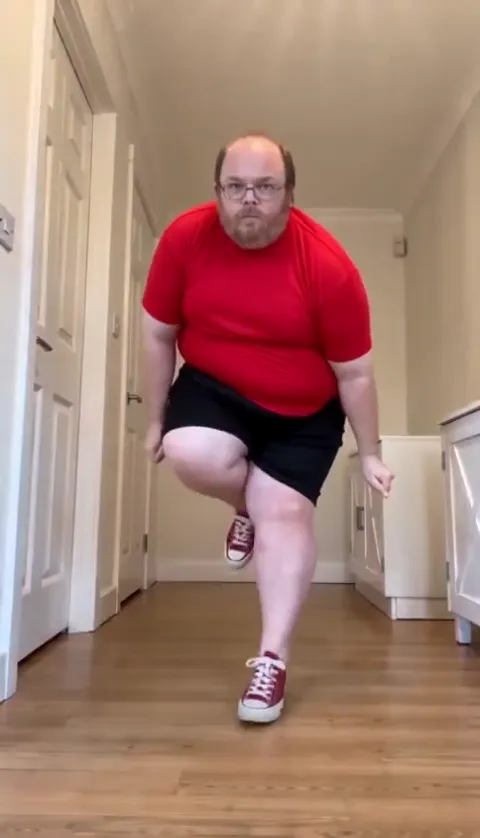
A CapCut template is better if you want the Toc Toc song over your own photos in a minute, and an AI generator is better if you want the actual hallway dance. Templates cut photos to the beat; they do not make anyone dance.
Key takeaways
- Template: an edit of stills you already own, set to the song.
- Generator: a performance built from one photo.
- Some templates need a paid tier or add a watermark. Check before you export.
- You can combine them: generate the dance, then finish it in an editor.
Is there a Toc Toc CapCut template?
Yes. Search “Toc Toc” in CapCut’s templates and you will find several, and most of them cut photos to the song rather than performing the routine. A template gives you the audio, the timing grid and a transition style. It does not give you a body that marches, knocks and hops, because it can only rearrange frames you supply. Some templates include AI effects that animate a face, so preview before you build on one, and check whether the export carries a watermark or needs a paid tier.
What does each route actually produce?
| CapCut template | AI app with a prompt | One-photo generator | |
|---|---|---|---|
| Face likeness | Your own photos, unchanged | Can drift on the fast march | Built from one photo |
| The routine | Rarely present | Close after retries | In order, from the low angle |
| Sound | Built into the template | Add it when you post | Add it when you post |
| Effort | A few taps | Prompting and retries | One upload |
| Cost | Check the template | The app’s own credits | 500 credits per 480p video |
Read it by column: the left wins on likeness and speed, the middle on control, the right on the dance itself. The gap between the first and last column is the gap between a slideshow and a performance.
Which route looks more like you?
A template, because it uses the exact photos you took. An AI generator rebuilds your face from a reference image, and the rebuild is where likeness is won or lost, especially as the dancer comes at the lens. A sharp head-to-feet photo is the main defence; the photo guide covers the framing. The AI version’s advantage is that it exists at all: no template can put your face on a body that hops on the beat.
How much does each route cost?
Check what a template or an AI feature costs before you build on one. On the Toc Toc AI video generator, a 480p video costs 500 credits and a 720p HD video costs 1,500. The $9.99 pack holds 500 credits, the $19.99 pack 1,500 and the $29.99 pack 2,500, which works out to $6.00 per 480p video. Packs are a one-time purchase, credits do not expire and failed videos refund their credits. Cost is the weakest reason to choose; whether the output is what you wanted to post matters more.
How do you do it in CapCut?
- Open CapCut and go to the Templates tab.
- Search “Toc Toc” and preview a few to see which use photos and which use clips.
- Tap Use template, add your photos or footage and preview the result.
- Export, then confirm the Toc Toc sound is attached before posting.
When should you use each?
- You already filmed the dance. Edit it in CapCut and make the ta-da land on the last beat.
- You want the look without the effort. A template gets you a postable edit in a minute.
- You want one clean pass. The one-photo generator removes the prompting and the manual sync.
Plenty of people combine them: generate the dance, then trim the opening and add a caption in an editor. The prompt route is covered in the Toc Toc AI prompt and the no-cost routes in the free options. YupPop is an independent tool and is not affiliated with CapCut, Patrick Sébastien or the creator of the original dance.
FAQ
Is there a Toc Toc CapCut template?
Search “Toc Toc” in CapCut’s templates and you will find several. Most cut photos to the song rather than performing the routine.
Why does the template never show anyone dancing?
A template rearranges the frames you give it, so a still photo stays a still photo. The marching, knocking and hopping come from a generative model.
Is the Toc Toc CapCut template free?
Check the template before you build on it. Some templates and AI features can sit behind a paid tier, and some exports carry a watermark.
Which route looks most like me?
A template uses your own photos unchanged. An AI generator rebuilds your face from one photo, so a sharp head-to-feet photo matters.
Can I edit a generated video in CapCut?
Yes. Download the MP4 from the generator and trim it, add a caption or attach the sound in any editing app.